This guide aims to explain how to assign key values to clients from MindBehind Live and APIs.
To assign a key value to clients from MindBehind Live and APIs, follow the steps below:
- Go to MindBehind Live.
- If the agent has an open live conversation with the correct client panel, they can select the Profile tab to add or remove a key-value property of the client.
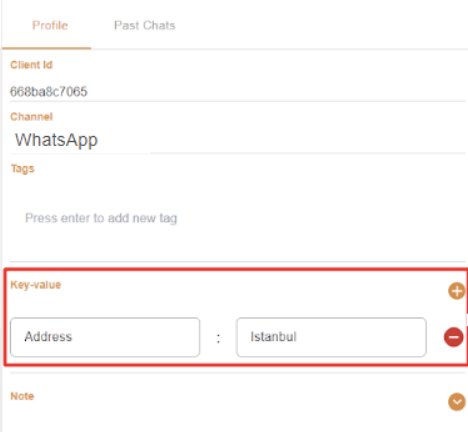
To use the APIs, you need the information below:
Get Client:
- Endpoint URL: https://app.mindbehind.com/live-core/getClient
- HTTP Method: GET
- Query Parameters: Should contain:
- clientID: This is your system client ID. It can be any string. You can also use your client's phone number if you want.
- companyID: This is your company ID. You can find that information on the Company Profile page.
- Result: You will get a JSON payload as follows:
{
name: string!;
surname: string!;
email: string!;
phone: string!;
companyID: string!;
clientID: string!;
channelType: string!;
tags: string[];
keyValueProperties: {key:string,value:string}[];
}
To set Key-Value Property:
- Endpoint URL: https://app.mindbehind.com/live-core/setKeyValueProperties
- HTTP Method: POST
- Body: Should contain:
- clientID: This is your system client ID. It can be any string. You can also use your client's phone number if you want
- KeyValueProperties: array of objects containing key as string and value as string ([{key:string,value:string}])
- Result: You will get a JSON payload as follows:
{
name: string!;
surname: string!;
email: string!;
phone: string!;
companyID: string!;
clientID: string!;
channelType: string!;
tags: string[];
keyValueProperties: {key:string,value:string}[];
}