Registration
Q: Which email clients support AMP?
A: Email clients are programs that send, receive, and store emails, such as Gmail, Outlook, and Yahoo. Email clients that support AMP can show the designed AMP modules in inboxes. The other clients will see the email without a designed AMP module or see the fallback content, if any. The clients that support AMP are Gmail Desktop, Mail.ru Desktop, Mail.ru mobile app, Yahoo, AOL Webmail, Yahoo on Android, Yahoo on IOS, Gmail on Android, and Gmail on IOS.
The email clients that support AMP are Gmail Desktop, Mail.ru Desktop, Mail.ru mobile app, Yahoo, AOL Webmail, Yahoo on Android, Yahoo on iOS, Gmail on Android, and Gmail on iOS.
Q: Do we need an additional integration or process to send AMP emails?
A: Follow AMP for Emails to complete your AMP whitelisting process. As the last step of this process, fill out the Sender Registration Form. Follow the steps on the AMP Sender Registration Form page to fill out the form.
Q: Can we start sending AMP emails in the warm-up period? Do we need to do anything for the sender domain?
A: You should have a good IP reputation. We recommend that you send AMP emails after your warm-up is completed.
You might find these articles helpful: Email Sender Reputation Fundamentals, Email Warm-Up.
Q: How can I check if my email design is ready for registration and does not contain any errors?
A: You can download your email content from your inbox and import it to the AMP playground to check if your AMP email template is missing anything or has any errors. If your email has any errors that need to be fixed, you will be notified beforehand and be able to correct them before sending them.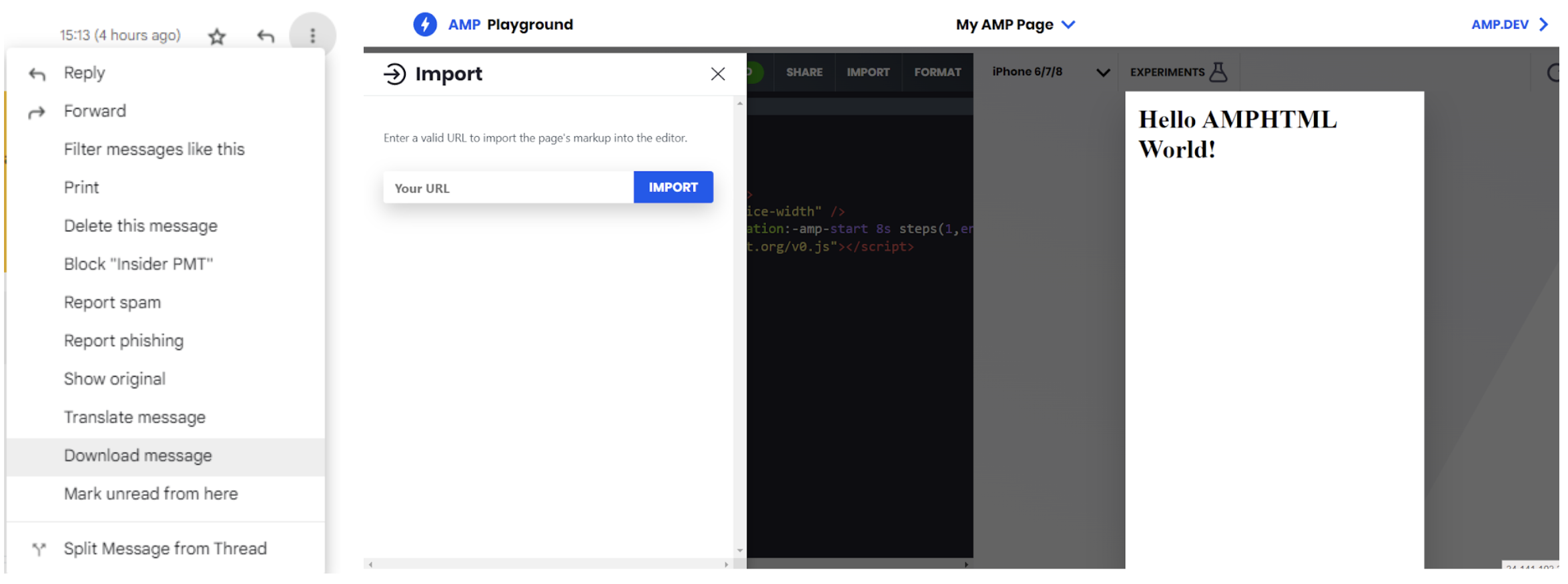
(4).png)
Q: I have applied for AMP registration, but my request got rejected. What might be the reason and how can I proceed after the rejection?
A: You should check the email sent by Google to the user's email address (the submitter of the form will receive the email), fix the issue mentioned in the rejection email, send the campaign for whitelisting, and resubmit the form. You can create a ticket to the Insider team if you need to get help.
Common rejection reasons are as follows:
1. Sending test/demo email for registration: You must send a complete, real, and production-quality email instead of a demo or test email. You can even modify one of your previous or planned templates and use it for registration. Ensure that your email subject or content does not include phrases that might indicate that the email is a test.
2. AMP doesn't have a fallback design: Each AMP block in your email design should have a compatible and consistent fallback design for inboxes that only support HTML.
3. Violating the spam guidelines: Your email should not contain spammy words, and you must double-check if your email follows the spam guidelines. Even if your email fulfills those criteria, you must have a low spam rate from your recipients.
4. AMP Registration form is not filled with expected answers:
Make sure you write your full email address once it is asked for (the Email address from which your AMP emails will be sent). The expected answer should be in the following sample format: info@poshstreet.com
Make sure you write only Sendgrid once it is asked for (Third-party ESP(s) used to send email through, if any).
Make sure you write your company’s DKIM domains and sendgrid.info once it is asked for (Please provide a (comma-separated) list of DKIM domains you will use to send AMP mails(. Expected answer should be in the following sample format: sendgrid.info, poshstreet.com
If your AMP registration is rejected several times, you shouldn’t need to worry since there is no submission limit, and previous submissions do not affect your ability to get permission for AMP.
Q: How can we check if Google has already whitelisted our domain?
A: You can select the domain and add the AMP templates from Insider Template in your email campaign to send yourself a test email from that campaign. If you see the AMP in your inbox, this means that your domain is whitelisted.
Dynamic email is enabled by default. Make sure it is not disabled.
Q: How can I see the AMP design in my inbox without whitelisting our domain?
A: Go to Enable dynamic email > Developer Settings to enter your domain. Then, follow steps 10 and 11 on AMP for Emails. .png)
Q: Can I test an email campaign with AMP emails?
A: Yes, you can. AMP emails will look the same in test emails and campaign launches. However, you cannot export the form responses if you send a test email with an AMP form. Exporting responses is available only if you launch the campaign.
Q: What determines if our AMP registration is successful or has failed?
A: Google individually verifies each sender with a strict security checklist. Insider is not involved in the registration process.
Q: How long does it take to get the result of AMP registration?
A: In approximately seven working days, you will receive an email about the result of your registration.
Q: I got my confirmation for the AMP registration, but the AMP block in my email design is not displayed in my inbox. What is the reason, and how can I fix it?
A: There could be several reasons why the AMP block in your email design is not displayed in the inbox. Here are some of the most common reasons and how you can fix them:
Having blank blocks in the design: Your email design should not have any blank blocks. For example, if you drag an image block to your design, you should either add the relative image in the design or completely delete it.
Images without directing links: Images both inside and outside AMP should have a valid link directing to a web page. This link can be your website’s landing page too. You can insert the link to the section below in the panel:
(3).png)
Non-functioning buttons: All buttons in the email design should be functioning and have a direct link to related websites.
If you want to be sure about the errors and missing parts in your email design, you can download your email content from your inbox and import it into the AMP playground to check your AMP email template.
Q: I use two sender domains in my Insider panel to send email campaigns. When sending from one of the domains, AMP content does not appear in my Gmail inbox. I don’t see this issue happening in the other sender domain. What could be the reason?
A: Ensure you use the domain that is authenticated during the warm-up process for email campaigns containing AMP. If the email is sent from a sender address with a DNS record that has not been properly shared or configured, AMP content will not display successfully in the AMP-supported inbox, even though AMP is successfully designed.
Email Design and Content
Q: Can we change colors or use emojis in the AMP design?
A: You can change colors and add emojis in the Drag & Drop editor.
Q: What is the best practice for sending AMP emails for inboxes that do not support AMP emails?
A: You can build a fallback for the users who cannot see the dynamic content. For example, you can build a fallback for your AMP forms.
Q: If we include both the AMP version and the fallback version in the design, will it make the email size too large and get it clipped?
A: Gmail will clip traditional HTML emails over 102 KB and AMP emails over 200 KB. That's why it is recommended to build your email with the important information you want your users to see.
If you still need help with reducing your email size, refer to Avoiding Email Clipping by Gmail.
Q: Can we use AMP emails in our Architect journeys?
A: Yes, you can also build AMP emails in your journeys.
Q: What is the video size in AMP emails?
A: AMP does not support video. Alternatively, you can add a video link to redirect your users to the respective page.
Q: What are the use cases of Insider support with AMP emails?
A: You can use Carousel, Accordion, and Form blocks. You can also check the prebuilt AMP modules in the email editor.
Q: Does the RSS Feed support AMP features?
A: No. RSS feed is a dynamic content. For example, you would need to upload images to a Carousel block manually. That's why RSS does not support AMP features.
Q: Can we use the HTML editor to edit the AMP Email features created by Drag and Drop? Can we combine AMP emails with HTML?
A: Yes, you can. You can use the Drag and Drop editor to create the AMP emails, copy its HTML and paste it into the HTML editor. You can also code your own AMP emails in the HTML editor.
Q: Can we remove previews from Carousel?
A: Yes, you can disable the "Display Preview" option to turn it off.
Q: Can we embed Google Form into email templates?
A: You can utilize the AMP form instead and still add a redirection to Google Forms as a fallback for email clients that do not support AMP. Google Forms is not part of AMP, and email providers do not support iframe structures inside their email designs.
Q: Can I use shortened URLs for website directions in my AMP email template?
A: Yes, you can use shortened URLs in your email templates. However, it's important to note that some URL shorteners may not be compatible with AMP design, and AMP may not be displayed in the inbox. Therefore, using the full version of the link instead of a shortened URL is recommended to ensure that your email lands in the inbox with AMP design.
Q: I would like to add dynamic images, such as abandoned product images, to my AMP block. Is it possible to insert dynamic image content into any AMP block with dynamic image syntax in the image path field, as below?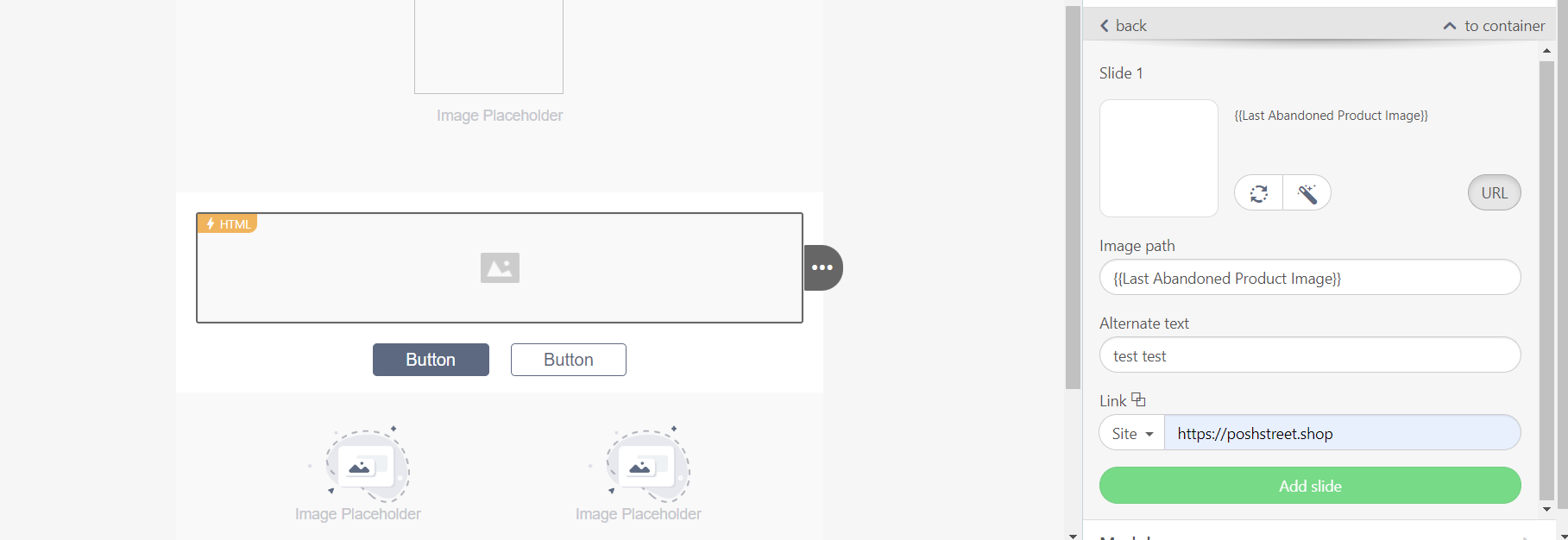 A: No, AMP does not support the syntax for dynamic images. It doesn’t work. Thus, if any dynamic image is used, the image will not be displayed.
Results and responses
Q: How can we collect/export the answers from the Email AMP Form?
A: Inside the Drag & Drop editor settings, you can choose the predefined service or your own service URL for data collection. The form responses will be saved based on your preference. If you choose the predefined service, you can export the form responses via the Campaign Analytics page. Refer to Exporting Email Campaign Analytics for further details. If you use your own service for data collection, Insider will not be able to provide any responses to you.
Q: Can we segment users according to the results of the AMP form? Moreover, can we see the individual answers on the user's UCP page?
A: Insider does not support this feature yet, but we are planning this improvement.
Q: Why cannot I see AMP in the email when I send it to a Google group or forward it to another email address?
A: AMP emails may not be displayed properly when forwarded or sent to Google Groups due to technical limitations.
Google Groups is an email list service that enables users to share and discuss topics with a group of people via email. When an email is sent to a Google Group, the email is distributed to all members of the group. However, Google Groups do not support AMP email technology, so any emails containing AMP content will be stripped of this interactive functionality when they are forwarded or sent to a Google Group.
This means that any AMP content, such as interactive forms, carousels, or menus, will not be visible in the forwarded or group email. The email will still be readable, but it will appear as a standard email without any interactive features.