Custom User Attributes let you personalize templates by dynamically inserting user-specific data. This ensures your messages feel relevant and tailored to each recipient.
Before using Custom User Attributes, your Custom User Attribute must be defined in String and Number Types.
Custom user attributes marked as PII are not shown in the dynamic content picker and cannot be selected for Web Templates. If an attribute you expect to use is missing, check its PII status under Attributes and Events.
How to use custom user attributes
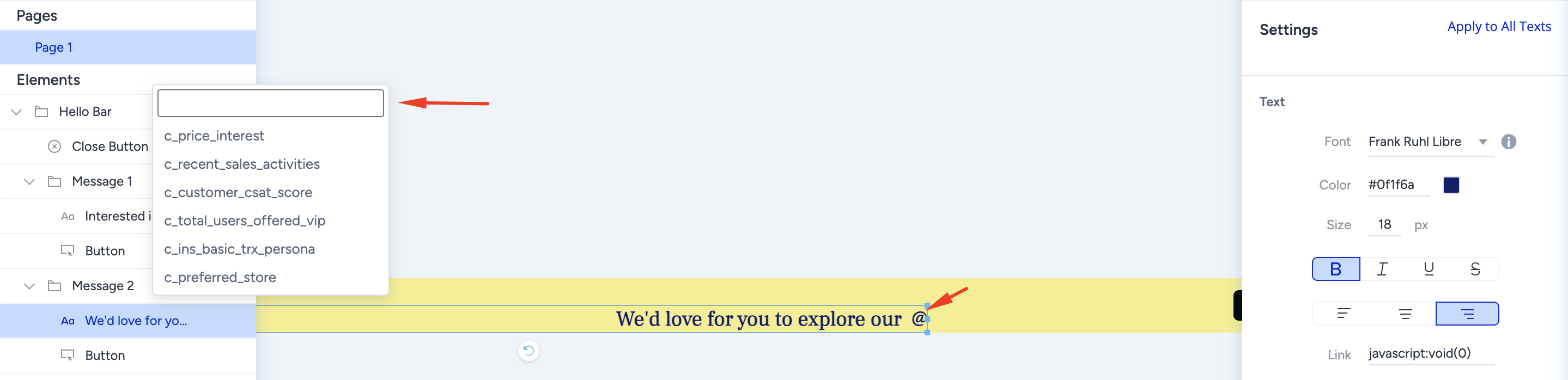
Insert dynamic attributes into your text by typing “@” in the text area.
A dropdown list of available attributes will appear, and you can select the one you need.
Example Scenario
Assume that you have a c_preferred_store attribute defined:
Message template: “Don’t forget to check out the new arrivals at your favorite store: @c_preferred_store.”
What the user sees: “Don’t forget to check out the new arrivals at your favorite store: Downtown Mall.”
This way, each user gets a message personalized with their saved preferred store.
Using Custom User Attributes is currently unavailable in Eureka, InStory, Smart Recommender, and Messaging channels.